 1 / 6
Channel Quest
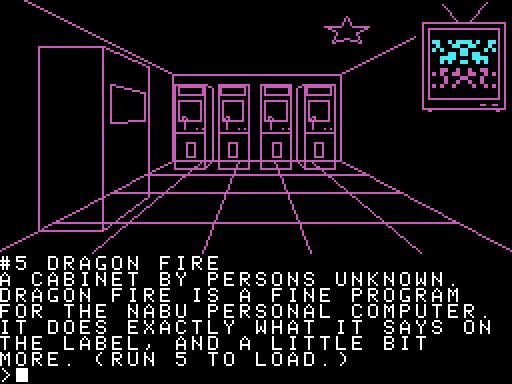
A text adventure headless. Walk into an old cable station where every channel is a room and every program is something in it. Line-drawn pictures like 1980 Apple II adventures, with each program's icon on a little TV.
How to run
- Open the Internet Adapter or Headless menu on your NABU or in MAME.
- Go to the Headless Menus channel category.
- Select Channel Quest and it will load.
About
Channel Quest turns the Internet Adapter's channel list into an old-school text adventure, in the style of the 1980 Apple II adventures. You start in a snowy field outside an old cable TV station. Every category is a room inside, and every program is something in that room.
Find it, LIST what's there, EXAMINE it and RUN it.
Pictures drawn the old way
Like Mystery House, no picture is a bitmap. Each room is a short list of points, drawn line by line while you watch (press any key to skip). Program icons appear too, on the LIST pages and on a little TV in the room.
Commands
Short two-word commands, then RETURN.
- Move: N S E W U D (or arrow keys), BACK, GO TO <room>
- Software: LIST, EXAMINE #, RUN #, FIND <word>
- Other: LOOK, EXAMINE, TAKE, INVENTORY, SCORE, HELP
- Screen: COLOR, MONO, GREEN, AMBER, TEXT, GRAPHICS, FAST, SLOW
The rest is for you to discover.
Try it from this Headless Menus channel, then set it as your default headless in the Internet Adapter's settings.