Make NABU Cable
The RS422 portion of the cable must be as short as possible when using a MIDI or serial cable, or, if possible, use two twisted pairs for very long runs. Also, keep the RS-422 cable away from AC power cords. The cable should be shielded only to the GND pin of the DTech RS422 adapter. Lastly, it is recommended to use a twisted-pair Ethernet cable instead of MIDI or serial. Connect the RX+ and RX- on the same twisted pair. Do the same with the TX+ and TX- on the same twisted pair. This cable is the lifeline for your NABU, so do not take a chance with a poor-quality alternative.
Some people choose to use a MIDI cable, but it won't be a twisted pair and isn't RS-422-compliant. If you are hard-set on using a MIDI cable because the 5-pin DIN connector matches the NABU, keep it short. And you won't get much support if you complain to users that the NABU keeps disconnecting, hehe. If you need a longer cable, consider extending the USB portion rather than the RS422 portion (unless it is a twisted pair).
Note: GND should be connected to the shield only at one end. If your cable is grounded on the DTECH connector, do not connect the shield to the outer rim of the DIN connector. Why?
Cable Testing
Ready to see if your NABU's lifeline cable is rock solid? NetMuse is the most communication-heavy application for the NABU because it plays a constant stream of audio. The best test is to run the NetMuse application and see if it locks up. Ideally, a proper setup will run NetMuse nonstop overnight. The longer it runs without locking up, the better your cable is.
Find the NetMuse application in one of two locations:
NABU Channel
On the Internet Adapter's main screen, there will be a list of NABU Channels. Locate the NetMuse in the list under Demos, and select it. You must double-click to select an item; the selected item will be displayed in yellow at the top status bar.
Cloud CP/M
Load Cloud CP/M from the NABU Channels list. When Cloud CP/M has loaded, you may type HELP for information on using it. If you are familiar with CPM, you can skip that step. The NetMuse application is titled NETMUSE.COM and can be found on the A: Drive in User Area 1. So, once you boot into CP/M...
- Type
USER 1to enter the User Area #1. - Type
DIRto see the list of files in the User Area #1. - Type
NETMUSEto execute the slidesho.com file.
Making The Cable
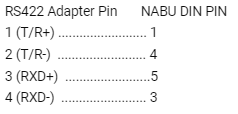
The NABU computer communicates with the Network Adapter with an RS422 connection. The DTech RS422 adapter will convert USB to the appropriate protocol required for the NABU to load files from your PC or Raspberry Pi.
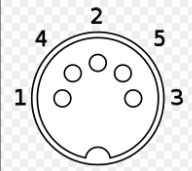
5 Pin DIN Pinout
This is the pinout of a 5-DIN connector from the solder side.
Note: GND should be connected to the shield only at one end. If your cable is grounded on the DTECH connector, do not connect the shield to the outer rim of the DIN connector. Why?
RS422 Breakout
If connecting directly to the DTech RS422 adapter breakout, use this image as a reference.
RS422 DB9 Cable
If you have a DB9 cable with wire codes. I recommend verifying the wires first, including the wire colors, to make it easier.
Note: GND should be connected to the shield only at one end. If your cable is grounded on the DTECH connector, do not connect the shield to the outer rim of the DIN connector. Troubleshootingoting